
tana
Product Company Community App Get early access
Community
Search
Log In
Log In Sign Up
Lucas Santoro

Lucas Santoro

Joined Feb 25, 2026 Last seen Feb 25, 2026
Posts 5 Comments 4

⁨Lucas Santoro⁩'s Posts

Newest Top
Newest Top
Lucas Santoro Lucas Santoro Feb 25, 2026

Fix the "Zoom out" shortcut in the windows app

Actions

Explain the problem as you see it

I'm mostly a keyboard navigator (Windows) and there is no zoom out button. When I search a node and I want to go a level above, there is no shortcut for that. We only have the go back button (Alt + Left), which takes us to the page we were originally.

Why is this a problem for you?

This is a problem because sometimes we don't know where a node is locaded. We can seach and select, but for going one level up in the breadcrumbt route I would need to go to the mouse or the finger pad and click the route

Suggest a solution

Fix the "Zoom out" shortcut in the windows app. As of today (Feb, 25th) it is working as a "Go back" function. It would be good to copy the windows Explorer shortcuts: Alt + Left = Go back. Alt + Up = Zoom out
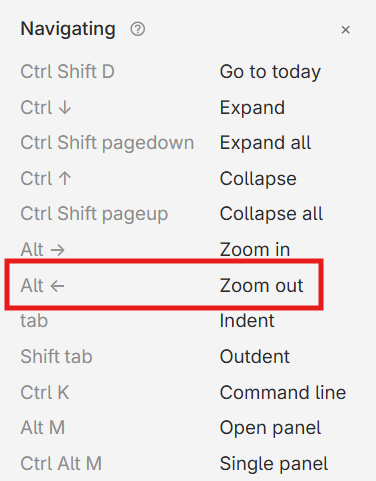
image.png
Works as "Go back" instead of "Zoom out" as specified. Please fix
0 ⁨0⁩ ⁨comments⁩
Lucas Santoro Lucas Santoro Feb 25, 2026

Backlinks in right side bar (similar to Obsidian's)

Actions

Explain the problem as you see it

Comming from Obsidian, bidirectional linking is very important. While possible in Tana, I only see the backlinks ("references") at the bottom of the page.

Why is this a problem for you?

I end up not using them as much because with no easy navigation back and forth between pages, there is no much benefit to networked thought. It ends up working as a collection of independent documents (every node is a paragraph inside a title node. Title nodes can be grouped by date or hashtag)

Suggest a solution

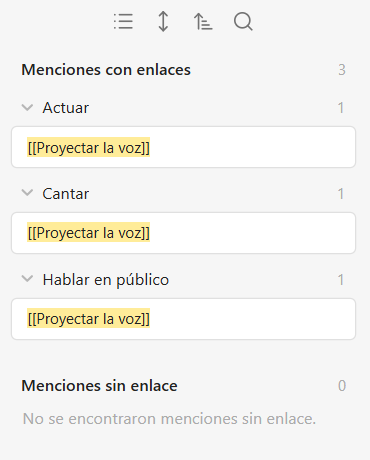
Please make a right side bar (similar to Obsidian's) for backlinks.

  • Mentions with links (#count)

node text with highlighted mention (#count)
> child node (#count)
highlighted mention in another node (#count)

  • Mentions without links (#count)

bla, bla, bla, highlighted mention (#count)

Just copy their side bar

image.png

0 ⁨0⁩ ⁨comments⁩
Lucas Santoro Lucas Santoro Feb 25, 2026

Respect the horizontal distance when navigating through nodes

Actions

Explain the problem as you see it

I'm mostly a keyboard navigator (Windows) and when I move from one node to another, the cursor is placed in at the start of the node

Why is this a problem for you?

The start of the node is the worst place. No use being there most of the time.

Suggest a solution

Respect the horizontal distance of the cursor to make navigation with arrow keys more intuitive.
BONUS: at Ctrl + Up, set the cursor to the end of the parent node.
BONUS 2: Also, it goes line by line when going down but node by node when going up. It would be more natural to keep the same criterion.

0 ⁨0⁩ ⁨comments⁩
Lucas Santoro Lucas Santoro Feb 25, 2026

Panel navigation with keyboard

Actions

Explain the problem as you see it

Currently there is no way to change panel with keyboard. There is a shortcut for opening in a new panel (Alt + M) but there isn't one to go back to the original panel. There is for closing all other panels (Ctrl + Alt + M) but there isn't a shortcut to close the current one (wich is probably more useful and intuitive)

Why is this a problem for you?

I end up with more than one pane but unable to use them or chose which ones to close (from keyboard)

Suggest a solution

  • Ctrl+PageUp and Ctrl+PageDown to navigate through panels
  • Ctrl+Q to close current panel. (If the previous panel to jump to has the closed node, the cursor would have to be placed at the end of that node)
0 ⁨0⁩ ⁨comments⁩
Lucas Santoro Lucas Santoro Feb 25, 2026

Shortcut to go to the end of the page (Page down)

Actions

Explain the problem as you see it

I'm mostly a keyboard navigator (Windows) and there is no quick way of getting to the bottom of the page to insert a new node. I learned the "Add to Today" shortcut (wich is helpful only in that node) but there isn't one for adding to the end of current page.

Why is this a problem for you?

It takes time to press and hold the Down arrow until reaching the bottom of the page/node

Suggest a solution

I would set "Page Down" to move screen long bits of nodes to reach the bottom faster. Currently, it moves the scroll bar but not the cursor

0 ⁨0⁩ ⁨comments⁩