
Explain the problem as you see it
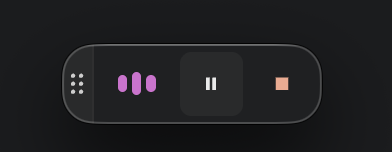
On Mac, live transcription shows a Floating Recording Menu—a small always-on-top overlay with animated audio waves indicating it’s listening + Pause and Stop buttons. It floats above other apps and can be visible even when I’m working elsewhere.
Why is this a problem for you?
It’s distracting, takes up screen space, and can cause misunderstandings in settings like lectures or meetings with screen sharing. It also reduces flexibility compared to Windows, where there isn’t such a menu. macOS already shows a microphone icon in the menu bar when the mic is in use, so there’s already a clear system-level indicator without needing an extra overlay.
Suggest a solution
Add a Mac setting to hide/disable or minimize the Floating Recording Menu during live transcription. Instead, if it isn’t already possible (and I’m simply unaware), please consider adding an option to set a keyboard shortcut for mute/unmute microphone.