

Explain the problem as you see it
I am using the Tana desktop app on my MacBook Pro with macOS v15.7.3.
The problem is that when I zoom in (just one zoom level) on Tana, the long menus are cut off at the top (e.g., the _configure supertag menu).
I attached a screenshot of the problem, showing the menu cut off. 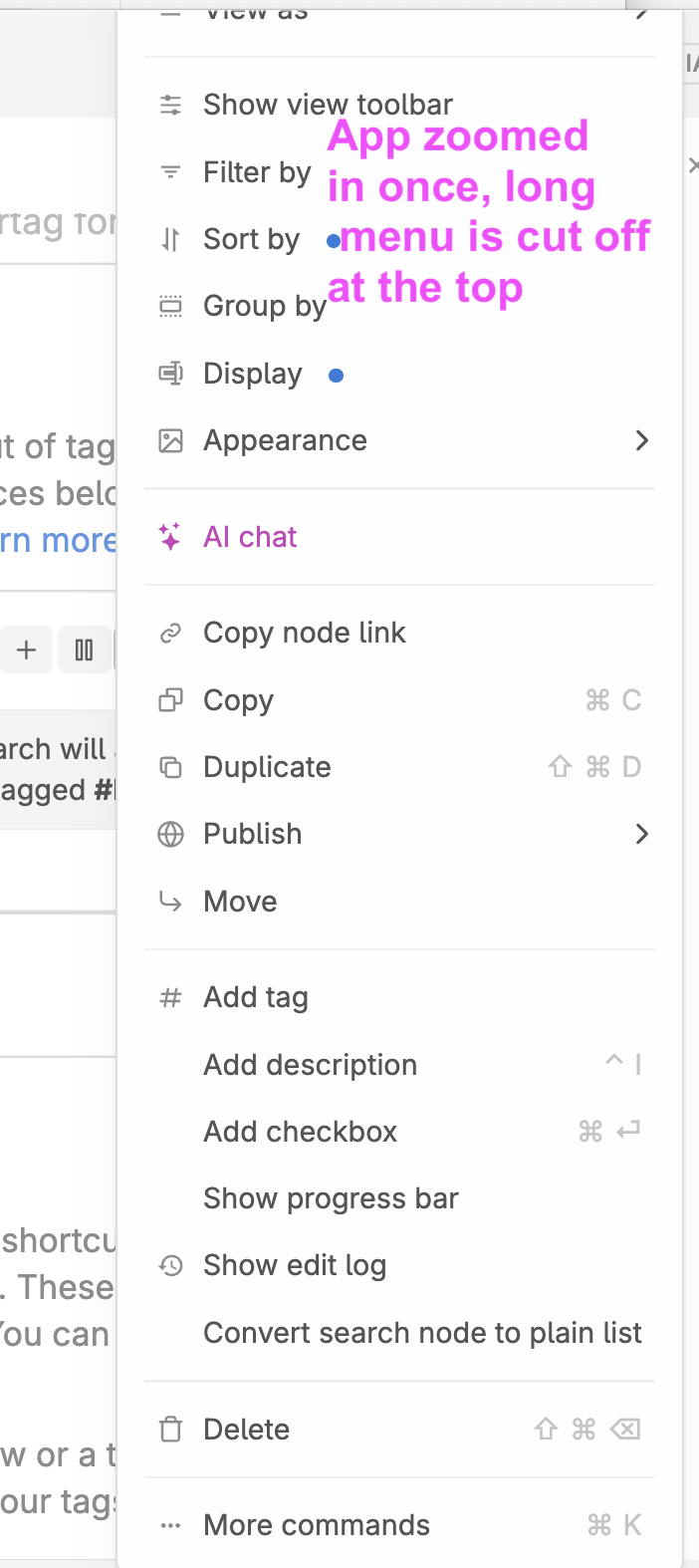
Why is this a problem for you?
I must zoom in for a larger text size when using Tana on my MacBook. It's non-optional for me. This bug is really annoying, as I have to keep resetting the zoom to zero to see the top of the long/cutoff menu, then I have to zoom back in again to do my work. I’m going back and forth, which is really frustrating and a waste of time.
This is an accessibility issue. In this modern day, this should work. The issue is a barrier to entry for new users.
Suggest a solution
Two things:
1) Fix your zoom to work correctly. It's just broken.
and
2) The ideal solution would be if you added Settings for us to be able to set the font size while using your app. Most apps have these font size Settings.
E.g., allow setting the font size for: Tana system things, the sidebar, node text, etc. This would really be the best overall solution.
1 Comment
I agree with Cynthia's post - setting the font size as an app feature is very important...critical even; zooming, as Cynthia pointed out - especially when cutting off - is highly problematic